 Kernhue
Kernhue vs CSS Peeper: which CSS inspector extension should you use?
Short answer: choose Kernhue if you want unlimited free inspections, OKLCH colors and one-click export of a page’s design tokens (CSS variables, Tailwind, W3C JSON). Choose CSS Peeper if downloading a page’s images and icons matters most to you.
Side by side
| CSS Peeper | Kernhue | |
|---|---|---|
| Point-and-click CSS inspection | Yes | Yes — copy CSS with defaults stripped |
| Free inspections | Basic inspector; 3 smart inspections per day | Unlimited |
| Font identification | Yes | Yes — highlights the family actually rendering |
| Page color palette | Yes, with export | Yes, with usage per color |
| Color formats | Not listed | HEX, RGB, HSL, OKLCH; reads Lab/LCH/Display P3 |
| Contrast check | Yes; advanced checker on Ultra | Free (WCAG AA/AAA) |
| Design-token export | Palette export | Colors, type, spacing, radius, shadows → CSS variables, Tailwind v4/v3, W3C JSON, DESIGN.md |
| AI token naming | Not listed | Pro (3 free tries, one-time) |
| Image & icon assets | Browse and download | — |
| Paid plans | $2.49/mo or $4.99/mo, billed yearly | $3 / month, $19 / year or $39 once |
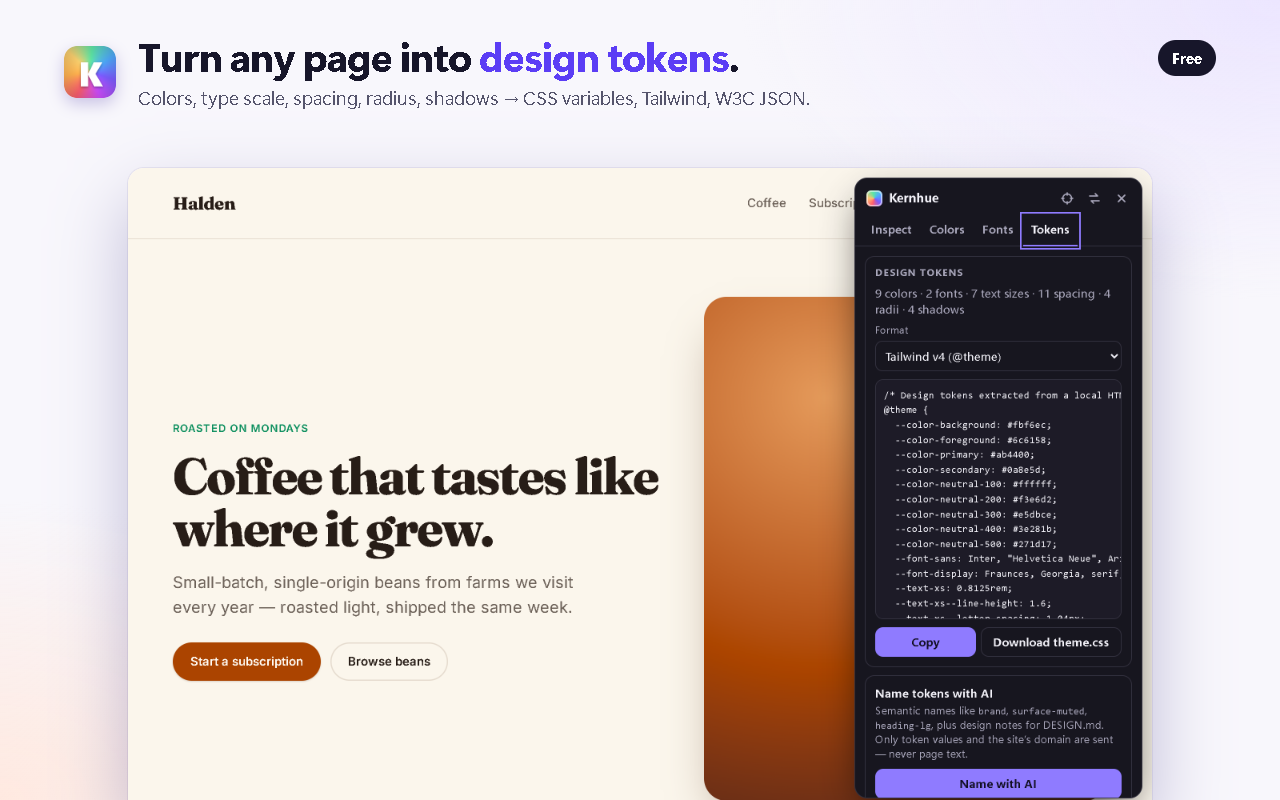
What Kernhue’s token export looks like
Open the Tokens tab on any page and pick a format. A Tailwind v4 export starts like this:
@theme {
  --color-background: #ffffff;
  --color-foreground: #1e1e28;
  --color-primary: #5b3df5;
  --font-sans: Inter, sans-serif;
  --text-base: 1rem;
  --text-base--line-height: 1.5;
  --spacing-4: 1rem;
  --radius-md: 8px;
}
Questions
Is CSS Peeper free?
CSS Peeper has a free plan with a basic inspector and 3 “smart inspections” per day; paid plans are Professional at $2.49/month and Ultra at $4.99/month, billed yearly (csspeeper.com/pricing, checked 2026-10-06).
Where is Kernhue stronger than CSS Peeper?
Kernhue exports a page’s design tokens as CSS variables, Tailwind v4/v3, W3C token JSON or DESIGN.md, supports OKLCH output, and keeps every inspection free with no daily cap. Pro adds AI naming for tokens.
When is CSS Peeper the better choice?
If you want to browse and download a page’s images and icons, CSS Peeper has an assets view; Kernhue focuses on fonts, colors, CSS and tokens and doesn’t export images.
Try Kernhue
Kernhue is a font finder, color picker and CSS inspector for Chrome. Hover any text to see the font that is actually rendering, pick colors in HEX, RGB, HSL or OKLCH, copy clean CSS for any element, and export a page’s colors, type scale and spacing as CSS variables, Tailwind or design-token JSON.
Coming soon to the Chrome Web Store